
Adobe Substance 3D Sampler: Professional Material Creation and 3D Digitization
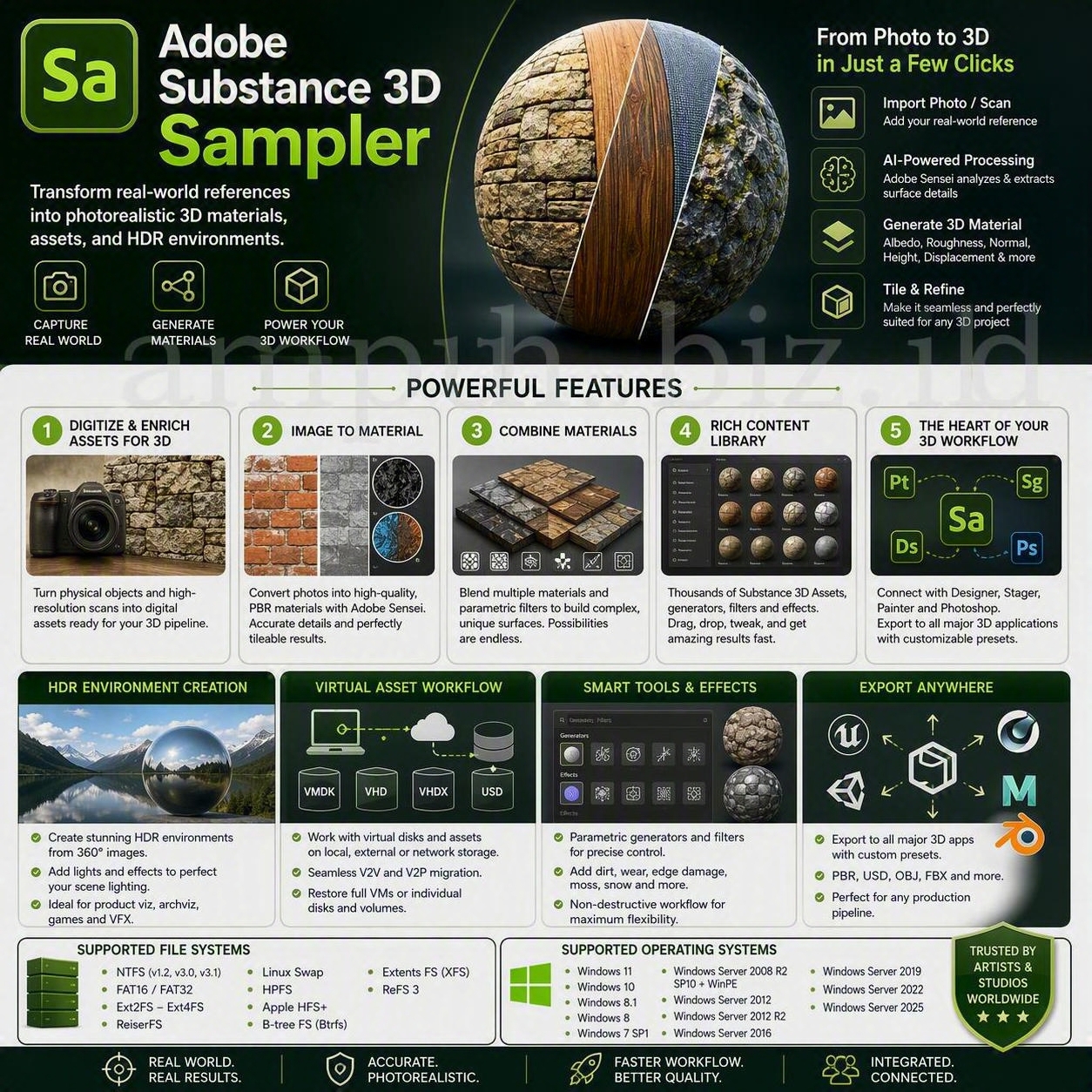
Adobe Substance 3D Sampler is a professional digitization and material authoring application designed to transform real-world references into production-ready digital assets.
Artists, designers, visualization specialists, and enterprise production teams can use photographs and high-resolution scans to create realistic materials, detailed surfaces, 3D assets, and HDR environments. Existing materials can also be combined, enhanced, and adapted through a flexible collection of generators, filters, and effects.
What Is Adobe Substance 3D Sampler?
Adobe Substance 3D Sampler is an application for capturing, processing, and enriching real-world assets for use in professional 3D projects. It helps creators convert photographs and scanned references into realistic digital materials, models, and lighting environments.
Instead of building every surface manually, users can begin with a photograph of an actual material such as stone, concrete, fabric, wood, metal, soil, or architectural finishing. Sampler analyzes the reference and provides tools for turning it into a reusable digital surface.
The application also supports the refinement of existing materials. Multiple sources can be blended, adjusted, and enhanced with procedural filters to produce more sophisticated surfaces for product visualization, architecture, games, visual effects, and virtual production.
Digitize and Enrich Assets for 3D Production
Adobe Substance 3D Sampler can serve as an important entry point in a digital content creation workflow. It enables production teams to capture the visual characteristics of physical objects and convert those characteristics into editable digital assets.
A captured asset can retain essential surface qualities while becoming easier to reuse, modify, distribute, and integrate into different scenes. This approach can reduce the need to author every material from the beginning.
Real-World Asset Capture
Photographs and compatible scanned references can be imported as the foundation of a new material. High-quality source images generally provide more useful surface information and greater flexibility during processing.
Digital Material Enhancement
Once imported, a source can be enhanced through filters, generators, adjustments, and procedural effects. These tools can help correct or reinterpret the captured surface while preserving the characteristics required by the project.
Photorealistic Surface Production
The resulting material can be applied to compatible 3D geometry and evaluated under different lighting conditions. This allows artists to review how the surface behaves before using it in a larger production.
Transform Real-World Images into 3D Materials
The Image-to-Material workflow is one of the principal capabilities of Adobe Substance 3D Sampler. It is designed to convert a reference photograph into a structured digital material that can be used in a physically based rendering workflow.
AI-assisted processing can analyze visual information within the source and generate material components representing different surface properties. Depending on the workflow and source, these components can include color, surface direction, reflectivity, and depth information.
Material Map Generation
The processing workflow can generate or assist with material channels such as:
- Base color or albedo
- Roughness
- Normal information
- Height or displacement
- Additional channels supported by the selected material workflow
Shadow and Lighting Reduction
Lighting information captured in a photograph can interfere with the reuse of a surface in a different 3D scene. Image-processing tools can help reduce unwanted shadows and lighting variations so that the digital material responds more naturally to new lighting.
Seamless and Tileable Materials
A material intended for a large digital surface should repeat without producing obvious borders. Sampler provides tools that can help transform an imported reference into a seamless, tileable material.
Tileable materials are particularly valuable for building walls, floors, terrain, fabric, roads, and other surfaces that cover an area larger than the original photograph.
Surface Detail Reconstruction
Surface information can be enhanced to reproduce small variations such as pores, fibers, scratches, grain, cracks, and irregularities. The quality of the final result depends on the source image, capture conditions, processing decisions, and intended output resolution.
Combine Materials and Parametric Effects
Adobe Substance 3D Sampler is not limited to reproducing a single photographed surface. Multiple materials can be combined to develop more complex and distinctive results.
A base material can be blended with another scanned surface, a procedural material, or a parametric effect. This approach allows creators to explore variations without permanently altering the original source.
Material Blending
Material blending can be used to merge different surface characteristics. A stone material, for example, can be combined with dirt, dust, moisture, moss, or weathering to produce a more developed appearance.
Parametric Filters
Parametric filters enable controlled adjustments through editable properties. Because the result remains adjustable, artists can create several material variations from a common foundation.
Natural and Weathering Effects
Supported effects can introduce natural or environmental characteristics such as:
- Dirt and dust accumulation
- Moss and organic growth
- Snow and moisture
- Surface wear
- Color variation
- Scratches and imperfections
- Fabric and pattern overlays
Creative Material Variations
A single scanned reference can become the basis for an extended material family. Teams can create clean, aged, damaged, wet, dusty, or stylized versions while retaining a consistent visual foundation.
Extensive Content Library for Faster Production
Adobe Substance 3D Sampler provides access to generators, filters, effects, and compatible material resources that can accelerate experimentation and production.
Users can import an image, apply prepared tools, and adjust the result without constructing every material channel manually. This streamlined process makes the application accessible to new users while still supporting advanced professional workflows.
Generators
Generators can produce controlled surface patterns or additional material information. They can be combined with captured sources to create a broader range of visual results.
Filters and Effects
Filters and effects can modify color, depth, roughness, surface condition, repetition, and other material characteristics. Parameters can be adjusted according to the visual and technical requirements of a project.
Substance 3D Assets
Compatible resources from the Substance 3D Assets library can be combined with sampled materials. Community-created resources may provide additional starting points, although licensing and production suitability should be reviewed before use.
Create HDR Environments and Image-Based Lighting
Adobe Substance 3D Sampler can also help generate HDR environment lighting from compatible panoramic images. These environments can provide realistic scene illumination and reflections for visualization and rendering.
Environment Creation from 360-Degree Images
A suitable 360-degree image can be processed as the foundation of an image-based lighting environment. The resulting environment can help reproduce the lighting characteristics of a real location.
Environment Enrichment
Additional light sources and effects can be introduced to refine the captured environment. This makes it possible to preserve the overall character of the original location while adapting the lighting to the requirements of a production.
Professional Lighting Applications
HDR environments can support:
- Product visualization
- Automotive rendering
- Architectural visualization
- Look development
- Virtual photography
- Visual effects production
- Environment matching
The Center of a Connected Substance 3D Workflow
Adobe Substance 3D Sampler is designed to exchange assets with other applications in the Substance 3D ecosystem. This connectivity allows sampled materials and lighting resources to move through a broader production pipeline.
Integration with Substance 3D Painter
Materials can be transferred to Substance 3D Painter for application to a 3D asset. Painter can then be used to refine the surface, introduce masks, add localized details, and complete the texturing process.
Integration with Substance 3D Stager
Materials and compatible lighting environments can support scene composition and visualization in Substance 3D Stager. This workflow can help teams evaluate an asset in a presentation-ready environment.
Integration with Substance 3D Designer
Compatible generators and filters created through Substance 3D Designer can contribute to a Sampler workflow. Procedural resources can be combined with captured materials to produce more advanced and adaptable surfaces.
Integration with Adobe Photoshop
Source images can be edited in Adobe Photoshop when detailed two-dimensional correction is required. The modified source can then be incorporated into the material creation process.
Export to Other 3D Applications
Export presets and configurable output options can be used to prepare assets for compatible third-party 3D applications and rendering pipelines. The correct preset should be selected according to the target renderer, material model, and channel requirements.
Professional Applications
The ability to transform real-world references into reusable digital assets makes Adobe Substance 3D Sampler relevant to several professional industries.
Product Visualization
Product designers and visualization teams can capture real finishes, fabrics, packaging materials, plastics, coatings, and manufacturing samples for use in digital presentations.
Architecture and Interior Design
Architectural teams can digitize flooring, stone, concrete, timber, wall coverings, fabrics, and other construction or interior materials.
Games and Interactive Media
Game production teams can use sampled materials as a realistic foundation for environments, props, terrain, and architectural assets.
Film and Visual Effects
Visual effects teams can reproduce physical surfaces and lighting references when building digital environments or matching virtual elements to photographed scenes.
Fashion and Textile Visualization
Fabric references can be digitized and adapted for virtual garments, product configurators, design reviews, and marketing visualization.
Digital Twin Production
Captured materials, objects, and lighting conditions can contribute to the creation of digital representations of physical assets. The technical accuracy required depends on the intended engineering, visualization, simulation, or marketing use case.
Recommended Adobe Substance 3D Sampler Workflow
- Prepare the physical sample. Clean the subject and remove temporary elements that should not appear in the resulting material.
- Use controlled lighting. Capture the sample under broad, consistent illumination to minimize strong shadows, glare, and extreme color variation.
- Capture sufficient detail. Use a high-quality photograph or compatible scanning method appropriate for the required output resolution.
- Import the reference. Add the image or scanned source to a new Sampler project.
- Choose the appropriate workflow. Select an image-to-material, capture, material, model, or environment process according to the source.
- Review generated properties. Inspect color, roughness, normal, height, displacement, and other relevant channels.
- Correct repetition. Adjust tiling and remove obvious seams or repeated visual features.
- Refine the material. Use filters, generators, masks, and parametric effects to improve the surface.
- Validate physical scale. Match the material dimensions to the approximate scale of the real-world surface where accurate representation is required.
- Test under multiple lights. Evaluate the material in neutral, directional, soft, and high-contrast lighting conditions.
- Select the target preset. Configure export channels, resolution, bit depth, and material conventions for the destination application.
- Export and validate. Inspect the material in the target renderer before approving it for production.
Best Practices for Enterprise-Quality Results
- Capture source images at the highest practical quality.
- Avoid strong directional shadows when photographing a material sample.
- Control reflections when capturing polished or metallic surfaces.
- Include sufficient surface area to support effective tiling.
- Preserve an unedited copy of every original reference image.
- Use consistent naming conventions for projects and exported maps.
- Record the physical dimensions of the photographed sample.
- Check material scale before publishing an asset.
- Inspect every generated material channel independently.
- Test exported assets in the final rendering environment.
- Confirm color-management requirements across the production pipeline.
- Document export presets for repeated enterprise workflows.
- Review third-party asset licenses before commercial distribution.
- Maintain versioned project files so that material decisions can be audited.
Frequently Asked Questions
What is Adobe Substance 3D Sampler used for?
Adobe Substance 3D Sampler is used to digitize physical references and transform photographs or scans into editable materials, models, and HDR lighting environments for compatible 3D workflows.
Can Substance 3D Sampler create materials from photographs?
Yes. Its image-to-material workflow can process a suitable reference photograph and generate material information for use in physically based rendering.
Can it create seamless textures?
Sampler provides tools for reducing visible borders and preparing tileable materials. The final quality depends on the source image, surface characteristics, and processing choices.
Which material maps can it generate?
Depending on the workflow and selected material model, Sampler can generate or process channels such as base color, roughness, normal, height, and displacement.
Can multiple materials be combined?
Yes. Multiple materials can be blended with filters, generators, and parametric effects to create more complex surfaces.
Can Substance 3D Sampler create HDR environments?
Compatible panoramic images can be used to build HDR environment lighting. Additional lights and effects can then be applied to refine the environment.
Does it work with Substance 3D Painter?
Materials created in Sampler can be incorporated into a Substance 3D Painter workflow for application, masking, detailing, and further surface refinement.
Can source images be edited in Adobe Photoshop?
Adobe Photoshop can be used to perform detailed two-dimensional corrections to compatible source images before or during the material development workflow.
Is Adobe Substance 3D Sampler only suitable for beginners?
No. The guided tools make the application approachable, while material blending, parametric effects, HDR environment creation, physical scale management, and ecosystem integration can support professional production pipelines.
Does an AI-generated material always match the physical sample perfectly?
No. Automated processing can accelerate material creation, but results should be evaluated and refined. Capture quality, lighting, reflections, surface complexity, scale, and output settings influence the final accuracy.
Conclusion
Adobe Substance 3D Sampler provides a streamlined method for converting real-world references into reusable digital assets. Photographs and scanned sources can become realistic materials, detailed surfaces, 3D assets, and HDR environments for professional visualization and content production.
Its image-to-material tools, material blending capabilities, parametric effects, content resources, and integration with the broader Substance 3D ecosystem make it valuable for individual creators and enterprise production teams.
The strongest results still depend on disciplined capture methods, appropriate physical scale, careful channel inspection, consistent color management, and validation within the final rendering environment.